Testing
You can run a Behaviour’s logic and check it without launching Unity. Neither uploading nor Play mode is needed.
Tests run by default on an interpreter that reproduces Udon’s semantics. Nothing is recompiled as ordinary C#, so anywhere C# and Udon disagree — the value an integer takes when it overflows, for instance — you get the Udon value. The runtime API is answered by mocks, though, so that part is not the same as the real thing.
The MCP server also offers a path that runs them as plain C# (Running as plain C#).
Syntax
Section titled “Syntax”Prepare the Behaviour you want to check. Calling Bump just increments value by one.
using Tsukimi;
public partial class TestingCounter : TsukimiBehaviour{    public int value;
    public void Bump()    {        value = value + 1;    }
    public void Reset()    {        value = 0;    }}
The test file
Section titled “The test file”Tests go in a separate file. Mark both the original class and the test side partial, and name the test file Name.Tests.cs. A file with this name is excluded from compilation, so tests never end up in what you ship and never run in a world.
using Tsukimi;
public partial class TestingCounter{    [TsukimiTest]    public void 増やすと1つ増える()    {        Bump();        Assert.AreEqual(1, value);    }
    [TsukimiTest]    public void 二回増やすと2になる()    {        Bump();        Bump();        Assert.AreEqual(2, value);        Assert.IsTrue(value > 0, "増えていない");    }}
You can touch private fields and methods as they are. They are in the same class, so there is no need to open them up to public for the test.
Tests left in the world-bound file
Section titled “Tests left in the world-bound file”| What happens | It works, but the method is built into the program that goes to the world and is exposed as an entry point |
| Warning | inspect reports TUKI0117 (Error) |
Declaring a test method
Section titled “Declaring a test method”A public void method with no arguments and [TsukimiTest] attached becomes one test. Methods without the attribute are not run, so helper methods that only get called from tests can sit in the same file.
There is no rule for how to name a method. Japanese is allowed, as in the example above, but the name is a C# identifier, so it cannot start with a digit.
Assert
Section titled “Assert”Checks are written with the static methods on Tsukimi.Assert. Six are available today.
Assert.IsTrue / Assert.IsFalse
Section titled “Assert.IsTrue / Assert.IsFalse”Takes a single bool and checks whether it is true or false. You can write the condition itself, so comparisons and range checks all gather here.
[TsukimiTest]public void 上限で止まる(){    charge = 120;    Clamp();
    Assert.IsTrue(charge <= 100);    Assert.IsFalse(charge < 0);}
Only the true/false value appears in the result. What was compared against what is not kept, so when you want to see that two values match, Assert.AreEqual gives a result that reads better.
Assert.AreEqual / Assert.AreNotEqual
Section titled “Assert.AreEqual / Assert.AreNotEqual”Compares two values. The first argument is the expected value, the second is the actual value. This order appears in the result text, so reversing them makes you misread it when tracking down the cause.
[TsukimiTest]public void 一度触ると1つ増える(){    Interact();
    Assert.AreEqual(1, count);    Assert.AreNotEqual(0, count);}
The argument type is object, so a number, a string, or a reference can all be passed. Passing a float directly compares the error that comes out of every computation as well, so it does not suit comparing real numbers.
Assert.IsNull / Assert.IsNotNull
Section titled “Assert.IsNull / Assert.IsNotNull”Checks whether a reference is null. Udon has no exceptions, and following a null reference halts the whole event without leaving a cause. This is the form that catches it beforehand.
[TsukimiTest]public void 初期化前は空のまま(){    Assert.IsNull(current);
    Setup();
    Assert.IsNotNull(current);}
Passing a Unity object needs care. A destroyed object can be in a state different from C#‘s null, so the result of these two can run against intuition.
Forms with a message
Section titled “Forms with a message”Every form has an overload with a trailing string message. When the check doesn’t hold, that string appears verbatim in the result.
Assert.AreEqual(80, charge, "1 回触ると 20 減るはず");Assert.IsTrue(charge > 0, "使い切っている");It helps when the values alone don’t say what was being checked, such as comparing values of the same type repeatedly or writing a long condition.
Restriction on where it can be used
Section titled “Restriction on where it can be used”Assert can only be written inside a method marked [TsukimiTest]. Using it outside is a compile-time error.
public void Interact(){ // Can't be written here (TUKI0114). Assert.IsTrue(count >= 0);}An Assert call is converted into a dedicated instruction that doesn’t exist in the runtime. If one slips into a program you ship, it halts as soon as execution reaches it. This restriction is there to catch that at compile time first.
Checking kernel computations
Section titled “Checking kernel computations”A method with [Kernel] runs on the GPU, so a test can’t call it. Methods that take or return Color4 or KernelId are also out of a test’s reach.
Move the computation you want to check into a static method that takes only float, int, bool, and Vector2. If both the kernel and the test call that same method, the very computation that runs on the GPU can be checked without Unity.
public static float NextHeight(float now, float before, float around, float damping){ return (now * 2f - before + (around * 0.25f - now) * 0.9f) * damping;}As long as the extracted method is called only from the kernel, the instruction count doesn’t grow. Once the behaviour side calls it too, that method is also converted to Udon and the instruction count grows.
Checking sync
Section titled “Checking sync”With Tsukimi.Mimic, you can place several players inside one test and check how sync plays out. Ownership transfer and sending are written as usual; Networking.SetOwner and RequestSerialization stay as they are. What Mimic adds is the 7 things there is no way to write while running as a single player.
| Syntax | Description |
|---|---|
Mimic.Join() | One player joins. The first one becomes you, and that player becomes the owner |
Mimic.Leave(player) | That player leaves. The player whose viewpoint you hold can’t be specified |
Mimic.Become(player) | Runs everything from here on as that player. Networking.LocalPlayer returns that player, and Networking.IsOwner answers relative to that player too |
Mimic.Deliver() | The queued values arrive at everyone except the player who sent them |
Mimic.Deliver(player) | The queued values arrive at that player only. This lets you write the case where a single player misses out |
Mimic.AdvanceFrames(n) | Time advances by n frames. Update runs for each participating player, in the order they joined |
Mimic.Explore() | Runs the test with every place whose order isn’t fixed permuted |
A value written by another player
Section titled “A value written by another player”One test checks a value written on the sending side all the way to its arrival on the receiving side.
using Tsukimi;
[UdonBehaviourSyncMode(BehaviourSyncMode.Manual)]public partial class TestingSyncCounter : TsukimiBehaviour{    [UdonSynced] public int count;
    public void Bump()    {        count = count + 1;        RequestSerialization();    }}
using Tsukimi;using VRC.SDKBase;
public partial class TestingSyncCounter{ [TsukimiTest] public void ValueWrittenByAnotherPlayerArrives() { VRCPlayerApi me = Mimic.Join(); VRCPlayerApi other = Mimic.Join(); Networking.SetOwner(other, gameObject);
Mimic.Become(other); count = 9; RequestSerialization(); Mimic.Become(me);
Assert.AreEqual(0, count); Mimic.Deliver(); Assert.AreEqual(9, count); }}The value changes across Mimic.Deliver. At the moment of sending, the receiving side’s value hasn’t changed; it changes at the moment of arrival.
Reordering
Section titled “Reordering”Mimic.Explore() runs the test repeatedly, permuting every place whose order isn’t fixed. The targets are places where the runtime guarantees no order, such as the order in which several synced fields carried in one payload arrive.
[TsukimiTest]public void ConsistentInAnyArrivalOrder(){    Mimic.Explore();
// Everything below runs once for each reordered combination.}| Where to write it | The first statement of the test. Placing it later is a compile-time error |
| When it doesn’t hold | The result shows which ordering it failed to hold under |
| Running time | Every ordering is run, so it takes longer than a test without it |
| Tests with nothing to reorder | There’s nothing to check, so it can’t be run |
| Tests with many places to reorder | When the number of orderings goes past the limit, the test can’t be run. The count is taken before running, so the answer comes back without a wait |
What it can check
Section titled “What it can check”Mimic is not a reproduction of the runtime. What it can check goes as far as what happens along the path you wrote, and there are 4 things it doesn’t have.
| What it does not reproduce | What follows |
|---|---|
| Network delay | The time until arrival can’t be measured |
| Send frequency | How many times the runtime actually sends is unknown |
| Values partway through interpolation | The intermediate values of Linear and Smooth don’t appear |
| Sending over the network | SendCustomNetworkEvent is only recorded and never arrives. A delayed send (SendCustomEventDelayedFrames and the like) aimed at another Behaviour is not runnable either |
| Orderings the runtime has | Mimic.Explore() permutes only the places this tool knows about. It can’t say here that the test holds under every order things might happen in |
Other Behaviours passed to the same run
Section titled “Other Behaviours passed to the same run”When the sources handed to test hold other Behaviours, one body of each is placed in the same world. A field is wired to one of those bodies when the type it is declared with names exactly one of them.
using Tsukimi;
public class Lamp : TsukimiBehaviour{    public int lit;
public void TurnOn() { lit = 1; }}using Tsukimi;
public partial class Switch : TsukimiBehaviour{ public Lamp lamp; // wired to the Lamp above
public void Press() { lamp.SendCustomEvent(nameof(Lamp.TurnOn)); }}using Tsukimi;
public partial class Switch{ [TsukimiTest] public void PressingItLightsTheLamp() { Press(); Assert.AreEqual(1, lamp.lit); // the Lamp really ran }}What happens on a wired Behaviour
Section titled “What happens on a wired Behaviour”| The call | Runs there and then |
| The other Behaviour’s fields | They are its own. Reads and writes reach its heap |
this, gameObject and transform inside its code | Mean that Behaviour |
GetProgramVariable and SetProgramVariable | Read and write the values on that Behaviour’s heap as they stand |
| A field that was not wired | Comes back as not runnable rather than being guessed at |
Ways that are not wired
Section titled “Ways that are not wired”| Syntax | Consequence |
|---|---|
| A field declared with the base type | There is no way to tell which Behaviour it means |
| A field declared with a type that two Behaviours in the run share | Which of the two it means is not decided |
| A Behaviour held in an array | Not wired |
| A Behaviour not handed to the same run | No instance of it exists |
| Code in the other Behaviour that calls a synchronization API | RequestSerialization, Networking.SetOwner and Mimic inside it cannot run. Its synced fields can only be read and written as plain fields |
How execution works
Section titled “How execution works”| Per test | Each runs with a fresh instance and heap. Values left behind by a previous test don’t carry over, so results don’t depend on execution order |
| Field initializers | They run once before the body of the test. The test starts from the values written on the declarations, so the initial state matches the runtime |
The bodies of startup events such as Start | They don’t run on their own. Write Start() in the body of the test when you want one to run (so that reading the test alone tells you what happens) |
| The first check that doesn’t hold | That test is cut short, and later Asserts in the same test don’t run |
Reading the results
Section titled “Reading the results”Results fall into 4 kinds.
| Result | Meaning |
|---|---|
| Passed | Ran to the end, and every Assert held |
| Failed | An Assert did not hold. The expected value, the actual value, and the source location are shown |
| Halted | It halted partway through execution. A form such as division by zero that halts at the same place in the runtime too |
| Not runnable | It couldn’t be run at all. This is not the same as an assertion failing; it appears when the call uses something the interpreter has no mock for. The wording splits in two: if the call exists in the runtime, the way you wrote it is fine and it simply can’t be checked here; if it doesn’t exist in the runtime, look at the call itself. Separating the part you want to check from that call sometimes makes it runnable |
Failure and not-runnable are kept apart because the fix belongs in different places (merge them and something that merely lacks a mock looks like a failing test).
Cost limits
Section titled “Cost limits”Every test result carries the cost that test ran up. Write a limit as an attribute and a test that goes over it fails. Use it to hold a frame-time budget.
using Tsukimi;using UnityEngine;
public partial class TestingAbsSum : TsukimiBehaviour{    public int total;
    public void Sum(int n)    {        total = 0;        for (int i = -n; i <= n; i++)        {            total = total + Mathf.Abs(i);        }    }}
using Tsukimi;
public partial class TestingAbsSum{ [TsukimiTest] [CostLimit(externs: 87, milliseconds: 0.0092)] public void SumOfAbsolutesIs110() { Sum(10); Assert.AreEqual(110, total); }
[TsukimiTest] [CallLimit("Abs", 21)] public void AbsAtMost21Calls() { Sum(10); Assert.AreEqual(110, total); }}What the result reports
Section titled “What the result reports”| Key | Meaning |
|---|---|
steps | The number of instructions executed |
externCalls | The number of extern calls |
estimatedMs | An estimate of the running time in milliseconds, from the two above times a unit price each |
suggestedLimit | A CostLimit line with the measured values as its arguments. Paste it and the test’s current cost becomes its limit. The milliseconds are rounded up to four decimals; no other headroom is added |
The result of running the first example above with no limit (one entry taken from the output of the MCP server’s test tool).
{ "name": "SumOfAbsolutesIs110", "source": "TestingAbsSum.Tests.cs", "steps": 544, "externCalls": 87, "estimatedMs": 0.0091668, "suggestedLimit": "[CostLimit(externs: 87, milliseconds: 0.0092)]", "outcome": "passed"}| When a key is absent | It means that way of running does not count cost. It does not mean the cost is zero |
| What the cost covers | The cost of the path the test took. Not the cost of actually playing |
| The Unity window | It appears to the left of each test result, in the form 87 ext / 0.0092 ms |
How to write a limit
Section titled “How to write a limit”| Syntax | The number the limit is placed on |
|---|---|
[CostLimit(externs: 87)] | The number of extern calls |
[CostLimit(milliseconds: 0.0092)] | The estimated running time |
[CostLimit(steps: 544)] | The number of instructions executed |
[CallLimit("Abs", 21)] | The number of calls whose name contains the given string. A test can carry more than one |
An item left out of CostLimit | That item has no limit |
| When a limit is exceeded | The test fails. failureKind becomes overLimit, expected holds the limit and actual the measured value |
| When an Assert fails first | The Assert failure is reported as it is. Limits are not looked at |
When steps is given a value at or above the step limit of the run | It is a limit that can never be exceeded, so the test cannot be run |
| Calls the estimate does not hold for | Creating objects, looking up by type, strings and arrays run heavier than the estimate. Put the limit on externs or CallLimit rather than on milliseconds |
| Running as plain C# | CallLimit counts the same way. A test that carries CostLimit, and a CallLimit naming a call this way of running cannot count, cannot be run |
How to run
Section titled “How to run”There are 2 ways to run tests. Both write the same results to the same place, so a run started in one can be read in the other.
From the Unity window
Section titled “From the Unity window”Open Tsukimi Tests under the TsukimiCode menu and press すべて実行 (Run all). Every program in the project is covered.
Results are grouped by source, with one of the 4 results at the right edge. For the ones that did not hold, the expected value, the actual value, and the location are shown underneath.
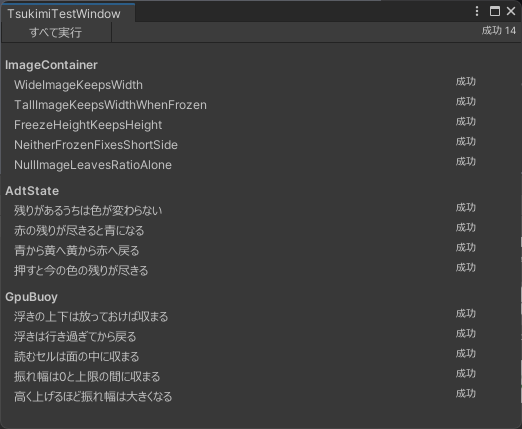
From the MCP server
Section titled “From the MCP server”Passing source to the test tool returns the same content as JSON. For how to write it, see the MCP server page.
Passing the location of a Unity project in projectPath also writes the results into that project. Go back to Unity and reopen the window to see them there.
Running as plain C#
Section titled “Running as plain C#”| How to choose it | Pass fast to the test tool. It can only be chosen from the MCP server |
| When to reach for it | While you are still iterating. It is fast, so the round of writing a test, running it and fixing what it caught is shorter |
| The question it answers | Whether the rules you wrote are right. It does not answer whether the compiled form is right, because that form is never produced |
| When other behaviours are passed along with it | This path does not place them in the same world, so sources declaring more than one behaviour make every test not-runnable. A field that should have been connected is never left empty for the run |
| Calls it does not model | They come back as not-runnable. It never quietly hands back a default value |
| The runtime type of an enum | Ask an enum assigned to an object for its runtime type name and this path answers with the enum’s name, while the default path answers with the integer’s |
| Tests that take a long time | This path has a step limit of its own, and going past it makes the test not-runnable. It counts differently from the default path, so a test can be not-runnable on one path and pass on the other |
| Which path ran | The result’s origin says so. Read it before reading a failure |
Where the results are kept
Section titled “Where the results are kept”The results of a run are placed in the project’s Library/Tsukimi/last-test-run.json. Library is a place Unity rebuilds, so it goes into neither version control nor what you ship.