A Skill is a set of instructions an AI client reads. It isn’t read while it sits inside the package, so it is written out into your project.
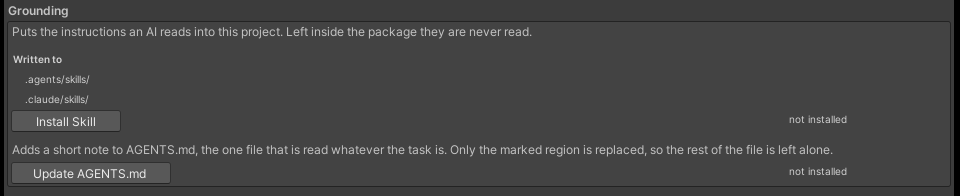
Open Tsukimi MCP from the TsukimiCode menu in Unity and work in the Grounding section. There are 2 destinations (.agents/skills/ and .claude/skills/).
| Item | What it does |
|---|
| Written to | Where they are installed. The two places above are listed |
| Install Skill | Writes the bundled Skills out to those two places |
| Update AGENTS.md | Adds a short note to the one file that is always read, whatever the task |
| |
|---|
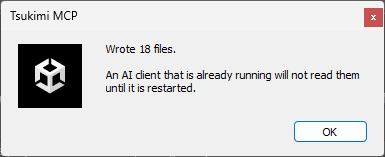
| File | 9 bundled files written to 2 places, so 18 files |
| When a file of the same name already exists | If the contents differ, it lists them and then overwrites |
| When it takes effect | Clients read them only at startup. Restart after pressing |
| After updating the package | Install them again. Files already installed are not updated on their own |
AGENTS.md is the one file that is always read, whatever the task. Two things are added: that this language isn’t in the training data, so inspect must be run before calling an error a bug, and when to read each of the two Skills above.
| |
|---|
| What it changes | Only the region between the markers. Anything you wrote yourself in the same file stays |
| How it differs from a Skill | A Skill is read only when the task matches it, while AGENTS.md is always read |
| Skill | When it is read |
|---|
tsukimi | When writing, fixing, or reviewing T# code. When a TUKI diagnostic or a compile error appears. Before answering whether a given form can be written, and before saying that a form is impossible or that this looks like a compiler bug |
tsukimi-porting | When moving existing code written for UdonSharp over to T#. A whole world, a single Behaviour, or a fragment lifted from a guide |
| |
|---|
| Its premise | This language isn’t in the training data, so it doesn’t write from memory: inspect decides |
| What it asks for | Send what you wrote to inspect, and don’t call it done until test is green |
| How to read a diagnostic | Sort by the cause category (origin). subset is an intended error, and rewriting the form makes it compile (MCP server) |
| When you may report it | The steps to take before saying that something looks like a compiler bug are laid down |
| What you check yourself | Whether the completion report comes with inspect and test results |
It carries 5 reference files.
| File | Contents |
|---|
before-writing.md | What to decide before you start writing. Only the decisions that force a rewrite when you get them wrong |
beyond-csharp.md | Features with no plain-C# counterpart. The side you can’t think of unless you know it exists |
synchronization.md | Synchronization, and everything none of it guarantees |
testing.md | The difference between compiles being true and behaving as intended |
reporting.md | When something may be reported as a compiler bug, and how to write it up |
| |
|---|
| What it covers | What to measure before moving, what order to clear the diagnostics in, and the changes that alter meaning |
| What to do first | Measure with inspect before making any changes |
| How changes are classified | Separates the forms that need changing from the ones that don’t |
| The most expensive decision | What holds the data (an array, or a row of Behaviours) |
It carries 2 reference files.
| File | Contents |
|---|
already-works.md | Forms that work as-is. A form you avoided emits no diagnostic, so the belief that it can’t be done never clears on its own |
rewrites.md | Forms that need changing. Every one was actually compiled before being written down |