Attributes
Forms that compile (15)
Section titled “Forms that compile (15)”| Syntax | Description | Note |
|---|---|---|
[UdonSynced] | Variable sync | |
[UdonSynced(UdonSyncMode.Linear)] | Sync with interpolation | Which kinds can be specified depends on the type. |
[UdonBehaviourSyncMode(BehaviourSyncMode.Manual)] | Specifying send timing | |
[UdonBehaviourSyncMode(BehaviourSyncMode.Continuous)] | Continuous sending | |
[FieldChangeCallback(nameof(Value))] | Change notification | |
[NetworkCallable] | Allowing calls over the network | |
[RecursiveMethod] | Allowing recursion | Because storage for parameters and local variables isn’t created per call. |
[Inline] | Inlining calls | |
[SerializeField] | Showing a private field | |
[HideInInspector] | Hiding a public field | |
[Header] [Tooltip] | Header and description | |
[Range(0f, 1f)] | Specifying a value range | |
[Space] | Spacing | |
[SerializeField, Range(0f, 1f)] | Multiple attributes on one field | |
[System.Obsolete] | Marking as obsolete |
Forms that don’t compile (3)
Section titled “Forms that don’t compile (3)”| Syntax | Description | Error | Reason | Alternative |
|---|---|---|---|---|
private int Down(int n) { return Down(n - 1); } | Calling itself without the attribute | TUKI0001 | runtime | Add [RecursiveMethod] (or write it with a loop or your own stack) |
SendCustomNetworkEvent(…, nameof(Take), 1) (without [NetworkCallable]) | Calling a method with arguments over the network by name, without the attribute | TUKI0001 | runtime | Add [NetworkCallable] on the receiving side |
[DllImport("x")] | Calls an external library | TUKI0001 | runtime | Use a method the runtime provides |
| The registered name of a method with parameters | Without the attribute it is registered under a name that includes the parameter types, which doesn’t match the name you wrote with nameof, so it can’t be referenced by name. Add [NetworkCallable] and it is registered under the name as written |
| The namespace of the sync attributes | They can be written from this language’s namespace. using the namespace you migrated from at the same time makes two attributes of the same name visible, which is a compile error (removing one of the usings makes it compile. File layout and namespaces) |
| The 5 not in this table | [Reactive], [Computed], [Effect], and [On] are under Reactive programming; [TsukimiTest] is under Testing |
Variable sync
Section titled “Variable sync”A variable with [UdonSynced] keeps the same value across players.
using UnityEngine;using Tsukimi;
public class AttributesSynced : TsukimiBehaviour{    [UdonSynced] private int value;
    void Start()    {        value = 1;        RequestSerialization();        Debug.Log(value);   // => 1    }}
Sync with interpolation
Section titled “Sync with interpolation”UdonSyncMode specifies the kind of interpolation.
using UnityEngine;using Tsukimi;
public class AttributesSyncedInterpolated : TsukimiBehaviour{    [UdonSynced(UdonSyncMode.Linear)] private float value;
    void Start()    {        Debug.Log(value);   // => 0    }}
Specifying send timing
Section titled “Specifying send timing”With Manual, the value is sent when you call RequestSerialization().
using UnityEngine;using Tsukimi;
[UdonBehaviourSyncMode(BehaviourSyncMode.Manual)]public class AttributesSyncModeManual : TsukimiBehaviour{    [UdonSynced] private int value;
    void Start()    {        value = 1;        RequestSerialization();    }}
Continuous sending
Section titled “Continuous sending”With Continuous, the value is sent without calling RequestSerialization().
using UnityEngine;using Tsukimi;
[UdonBehaviourSyncMode(BehaviourSyncMode.Continuous)]public class AttributesSyncModeContinuous : TsukimiBehaviour{    [UdonSynced] private int value;
    void Start()    {        value = 1;    }}
Change notification
Section titled “Change notification”When a synced value arrives, the setter of the specified property is called.
using UnityEngine;using Tsukimi;
public class AttributesFieldChangeCallback : TsukimiBehaviour{    [UdonSynced, FieldChangeCallback(nameof(Value))] private int backing;
    public int Value    {        get { return backing; }        set { backing = value; }    }
void Start() { Value = 1; Debug.Log(Value); // => 1 }}Allowing calls over the network
Section titled “Allowing calls over the network”A method called across the network with arguments needs this attribute.
using UnityEngine;using Tsukimi;using VRC.SDK3.UdonNetworkCalling;
public class AttributesNetworkCallable : TsukimiBehaviour{    [NetworkCallable]    public void Receive(int n)    {        Debug.Log(n);    }
    void Start()    {        Debug.Log(1);   // => 1    }}
Allowing recursion
Section titled “Allowing recursion”A method that calls itself needs this attribute.
using UnityEngine;using Tsukimi;
public class AttributesRecursiveMethod : TsukimiBehaviour{    [RecursiveMethod]    private int CountDown(int n)    {        return n <= 0 ? 0 : CountDown(n - 1);    }
    void Start()    {        Debug.Log(CountDown(3));   // => 0    }}
Inlining calls
Section titled “Inlining calls”A method with this attribute is expanded at the call site regardless of its size.
using UnityEngine;using Tsukimi;
public class AttributesInline : TsukimiBehaviour{    [Inline]    private int Twice(int n) { return n * 2; }
    void Start()    {        Debug.Log(Twice(2));   // => 4    }}
The Inspector
Section titled “The Inspector”Showing a private field
Section titled “Showing a private field”Even a non-public field can be assigned a value from the Inspector.
using UnityEngine;using Tsukimi;
public class AttributesSerializeField : TsukimiBehaviour{    [SerializeField] private int value;
    void Start()    {        Debug.Log(value);   // => 0    }}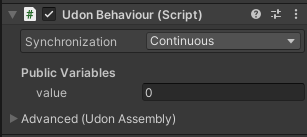
Hiding a public field
Section titled “Hiding a public field”The field stays public but no longer appears in the Inspector.
using UnityEngine;using Tsukimi;
public class AttributesHideInInspector : TsukimiBehaviour{    [HideInInspector] public int value;
    void Start()    {        Debug.Log(value);   // => 0    }}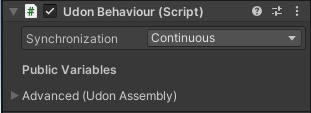
Header and description
Section titled “Header and description”[Header] shows a heading, and [Tooltip] shows a description on hover, in the Inspector.
using UnityEngine;using Tsukimi;
public class AttributesHeaderAndTooltip : TsukimiBehaviour{    [Header("Group")]    [Tooltip("note")]    public int value;
    void Start()    {        Debug.Log(value);   // => 0    }}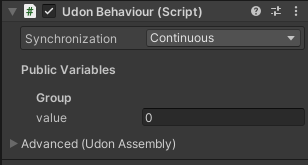
The description only appears on hover, so it isn’t in this image.
Specifying a value range
Section titled “Specifying a value range”It becomes a slider in the Inspector, and values outside the given range can no longer be assigned.
using UnityEngine;using Tsukimi;
public class AttributesRange : TsukimiBehaviour{    [Range(0f, 1f)] public float value;
    void Start()    {        Debug.Log(value);   // => 0    }}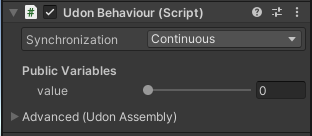
When the Inspector is narrow, no slider appears and only the numeric field is shown. The range restriction applies just the same.
Spacing
Section titled “Spacing”Adds spacing between items in the Inspector.
using UnityEngine;using Tsukimi;
public class AttributesSpace : TsukimiBehaviour{    [Space]    public int value;
    void Start()    {        Debug.Log(value);   // => 0    }}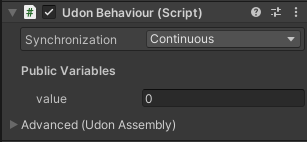
The one above has the spacing. Without it, they sit flush like this.
Multiple attributes on one field
Section titled “Multiple attributes on one field”using UnityEngine;using Tsukimi;
public class AttributesMultipleOnOneField : TsukimiBehaviour{ [SerializeField, Range(0f, 1f)] private float value;
void Start() { Debug.Log(value); // => 0 }}Marking as obsolete
Section titled “Marking as obsolete”Using a member with this attribute produces a warning.
using UnityEngine;using Tsukimi;
public class AttributesObsolete : TsukimiBehaviour{    [System.Obsolete]    public void Old() { }
    void Start()    {        Debug.Log(1);   // => 1    }}