MCP server
A server that lets an AI client call the compiler itself. It ships inside the package, and the client launches it according to its configuration.
The setup window
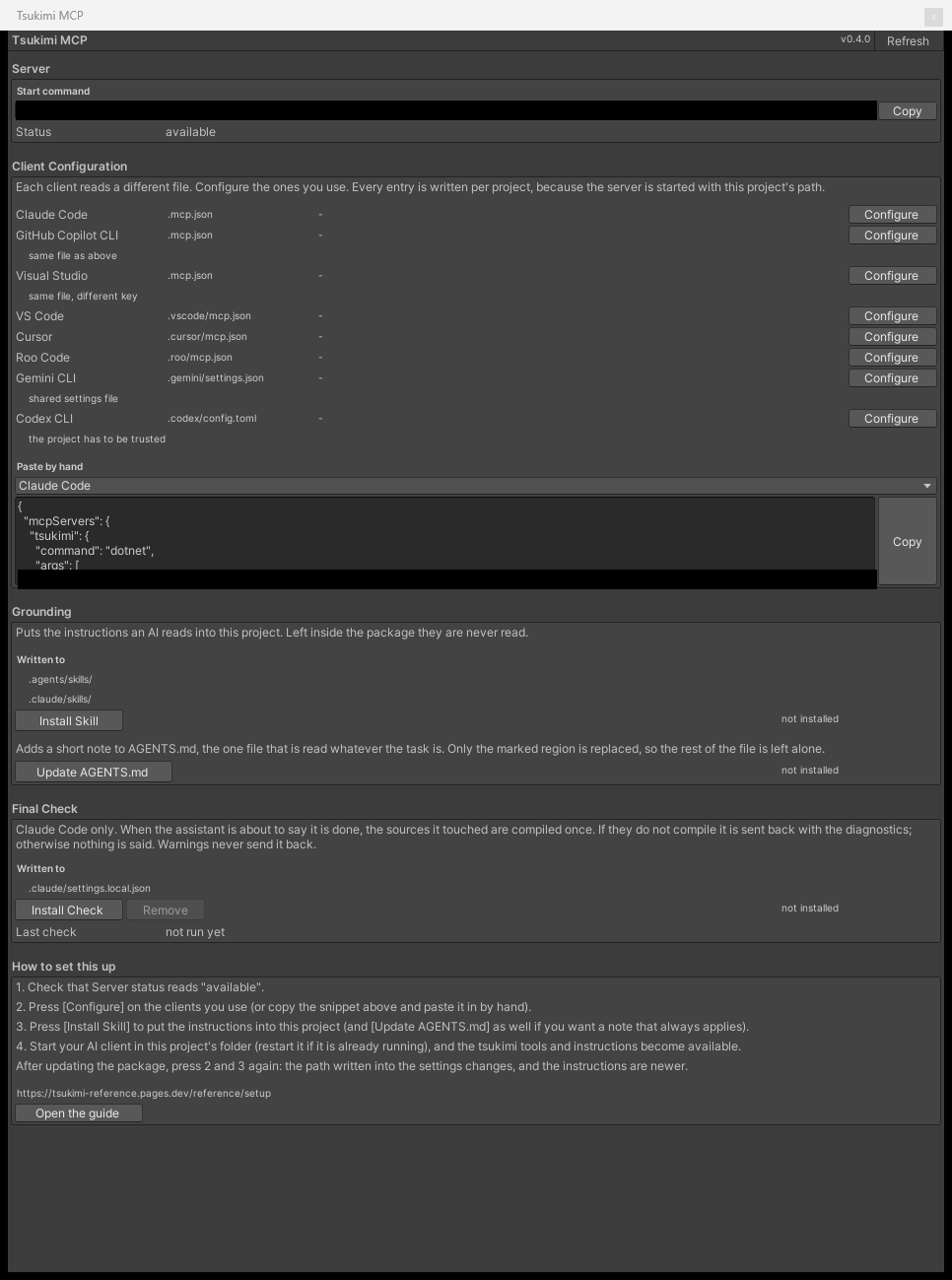
Section titled “The setup window”Open Tsukimi MCP from the TsukimiCode menu in Unity. There are 5 sections, arranged to be worked through from the top.
| Section | Button | Purpose |
|---|---|---|
| Server | None | The launch command for the bundled server, and whether the binary is present |
| Client Configuration | Configure | Writing to the configuration file of the client you use |
| Grounding | Install Skill・Update AGENTS.md | Writing out the instructions for the AI to read (Skills) |
| Final Check | Install Check・Remove | Installing a hook that checks the declaration of completion |
| How to set this up | None | The steps above, in English |
Server
Section titled “Server”| Start command | The command the client actually runs is shown verbatim |
| Status is available | The bundled server is present |
| Status is not found | The server DLL can’t be found. Reinstalling the package brings it back |
Client configuration
Section titled “Client configuration”The configuration file and the key differ per client, so 8 variants are written out separately.
| Client | Configuration file | Key | Format | Notes |
|---|---|---|---|---|
| Claude Code | .mcp.json | mcpServers | JSON | |
| GitHub Copilot CLI | .mcp.json | mcpServers | JSON | The same file as Claude Code |
| Visual Studio | .mcp.json | servers | JSON | A different key in the same file |
| VS Code | .vscode/mcp.json | servers | JSON | |
| Cursor | .cursor/mcp.json | mcpServers | JSON | |
| Roo Code | .roo/mcp.json | mcpServers | JSON | |
| Gemini CLI | .gemini/settings.json | mcpServers | JSON | The same file as its other settings |
| Codex CLI | .codex/config.toml | mcp_servers | TOML | The project must be trusted separately |
Writing the settings by hand
Section titled “Writing the settings by hand”Pick a client from the dropdown in the same section and the text to paste is shown as-is (the two paths are filled in with absolute paths for that project).
{ "mcpServers": { "tsukimi": { "command": "dotnet", "args": ["<package location>/Server~/TsukimiCode.Mcp.dll", "<project location>"] } }}Codex CLI alone uses TOML.
[mcp_servers.tsukimi]command = "dotnet"args = ["<package location>/Server~/TsukimiCode.Mcp.dll", "<project location>"]| The project location argument | The server needs it to read the database of runtime APIs generated for that project |
| If it is omitted | The check for whether an API exists does not run |
The compile check when work is reported as done
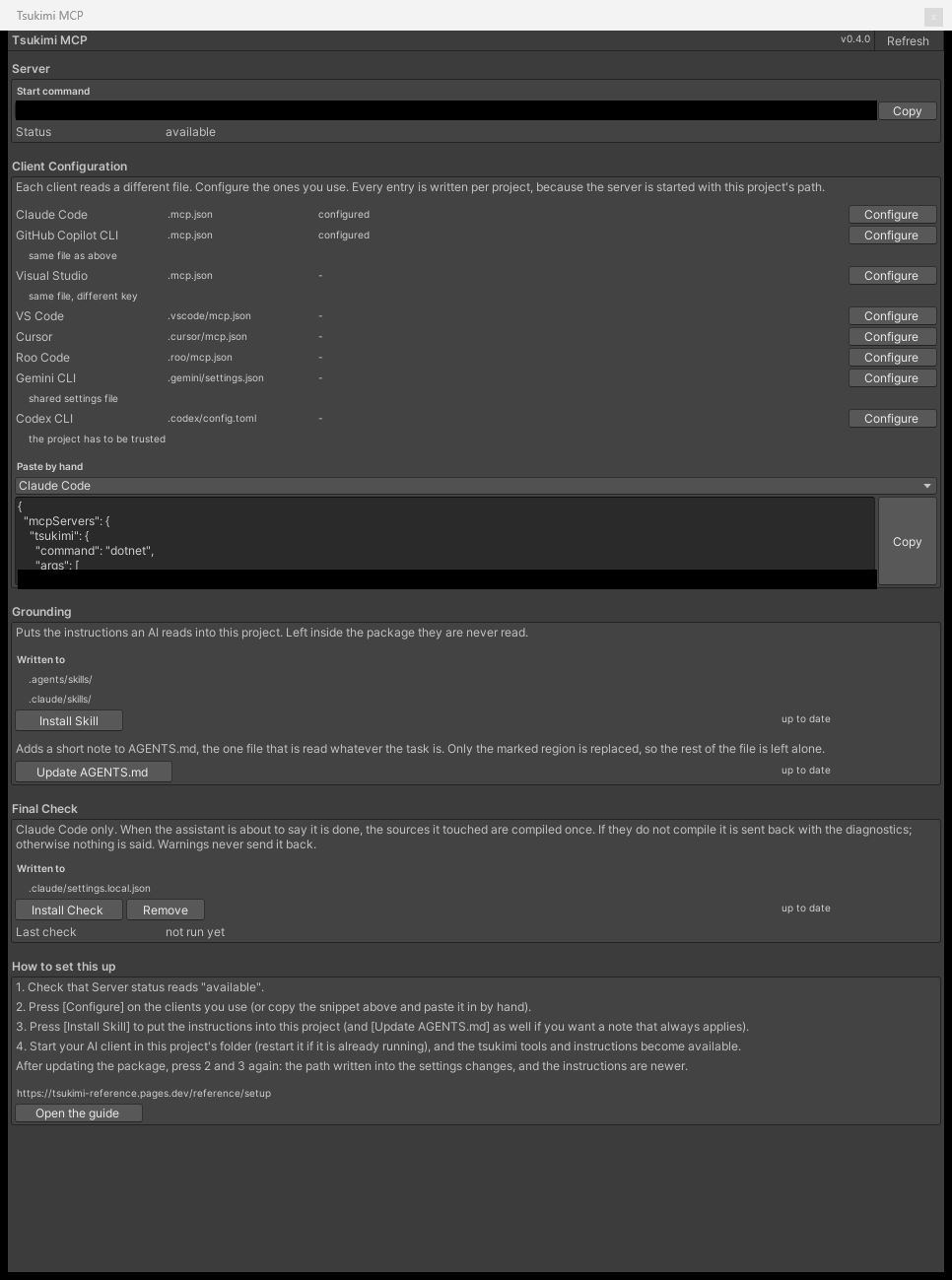
Section titled “The compile check when work is reported as done”Pressing Install Check writes a hook into .claude/settings.local.json, and when the AI is about to say it has finished, the T# sources changed in that session are compiled once.
| Case | What happens |
|---|---|
| Compilation failed | Hands back the diagnostics and asks for the work to continue |
| Only warnings appeared | Doesn’t send it back |
| Compilation succeeded | Says nothing. The last result appears under Last check in the window |
| The check itself doesn’t run | Lets it through rather than stopping. A broken check must not keep blocking work |
| The same diagnostic twice in a row | Lets it through. It has decided the problem cannot be fixed and stops |
| Which client this covers | Claude Code only. The hook mechanism exists only there |
| Where it is written | A configuration file not meant for sharing, because absolute paths go into it |
| Remove | Only this hook is removed. Other settings in the same file stay |
There are six.
| Tools | Description |
|---|---|
ping | Check whether the server is running |
inspect | Compile source and return diagnostics and facts |
test | Run the methods marked with [TsukimiTest] |
diagnostics | List of error numbers |
spec | Generate a description of this language |
decompile | Turn a compiled assembly into a readable form |
inspect and test are the core; ping checks the connection, diagnostics and spec interpret what inspect returned, and decompile is for examining a program that already exists.
Checks only whether the server is running. It takes no arguments.
"tsukimi-mcp ok (static-analysis MCP; liveness check)"Use it right after registering, to tell whether the configuration is in effect.
inspect
Section titled “inspect”Compiles the source and returns the result as structured JSON.
Arguments
Section titled “Arguments”| Arguments | Description |
|---|---|
source | The full text of one source file |
file | The file name used for diagnostic locations. <inline> when omitted |
sources | Multiple files. An array of {name, text}. Takes precedence over source |
cost | Whether to measure instruction count and heap. Omitted, nothing is measured. Measuring runs the same optimization as shipping does, so most of this call’s time goes there |
One source can declare only one concrete Behaviour, so pass several at once through sources when you want to check a shape like the one below.
- Implementing an interface with a Behaviour
- Splitting into a base Behaviour and a derived Behaviour
- Calling a method on another Behaviour from one Behaviour
- Receiving a component as a Behaviour type
Writing two in a single source and getting an error is a mistake in how you passed them, not something the language can’t do (pass them through sources and the results are split per Behaviour, landing in each element of programs rather than at the level above).
What comes back on a successful compile
Section titled “What comes back on a successful compile”This is the result of passing the following source as source with cost set to true. Without cost, the two keys heap and cost are absent altogether.
using UnityEngine;using Tsukimi;
public class Lamp : TsukimiBehaviour{    [SerializeField] private Light target;    [UdonSynced] private bool on;
    public override void Interact()    {        on = !on;        target.enabled = on;        RequestSerialization();    }}
{ "schemaVersion": 1, "compiles": true, "diagnostics": [], "facts": { "heap": { "slots": 11, "limit": 1048576, "remaining": 1048565 }, "cost": { "instructionCount": 12, "staticExternCount": 3, "nsPerExtern": 77, "nsPerNonExtern": 5.4, "isStraightLine": true }, "entries": [ "Interact" ], "recursiveMethods": [], "loopCount": 0, "methods": [ { "name": "Interact", "isEntry": true, "isRecursive": false, "params": 0, "locals": 1, "loops": 0, "externs": 3, "entryName": "_interact" } ], "runtimeRisk": [], "contract": { "synced": [ { "name": "on", "type": "SystemBoolean", "sync": "none" } ], "exportedFields": [], "syncMode": "any" }, "nullDerefRisks": [ { "kind": "unassignedFieldDeref", "severity": "warning", "origin": "runtime", "message": "The reference field 'target' (type UnityEngineLight) is shown in the Unity Inspector and is never assigned in code, so its value comes only from there. ...", "method": "Interact", "field": "target", "type": "UnityEngineLight", "deref": "UnityEngineLight.__set_enabled__SystemBoolean__SystemVoid" } ] }, "summary": { "total": 0, "bySeverity": {}, "byOrigin": {} }, "externDb": { "resolved": true, "unknownApiChecks": true, "externCount": 32898 }}| What to look at | |
|---|---|
diagnostics empty, compiles true | This source compiles |
One entry in nullDerefRisks | target is never assigned anywhere in the code; its value can only come from the Inspector. Forget to assign it and it stays null at runtime, and the assignment to target.enabled silently cuts the whole event short (Udon has no exception handling, so nothing appears in the log either) |
nsPerExtern and nsPerNonExtern under cost | Roughly how long one extern call and one non-extern instruction take. The gap between the two shows that how many times you call an extern matters more than the instruction count itself |
What comes back on an error
Section titled “What comes back on an error”This is an example that uses a type that does not exist in Udon.
using System.Collections.Generic;using UnityEngine;using Tsukimi;
public class Bag : TsukimiBehaviour{    private List<int> items;
    public override void Interact()    {        items = new List<int>();        items.Add(1);        Debug.Log(items.Count);    }}
{ "schemaVersion": 1, "compiles": false, "diagnostics": [ { "code": "TUKI0102", "severity": "error", "message": "Variable type does not exist in Udon: field items has the type SystemCollectionsGenericList", "explain": "This type does not exist in Udon (outside the extern database).", "location": { "file": "Bag.cs", "startLine": 7, "startCol": 23, "endLine": 7, "endCol": 23 }, "fix": "This type cannot be used here (it is outside the usable Udon extern set). ... For lists and dictionaries, use the VRChat data containers DataList / DataDictionary (VRC.SDK3.Data) - generic List<T> / Dictionary<K,V> are not usable.", "witness": "SystemCollectionsGenericList", "origin": "subset", "path": null }, { "code": "TUKI0101", "severity": "error", "message": "Not exposed to Udon: SystemCollectionsGenericList.__ctor____SystemCollectionsGenericList", "explain": "This API is not exposed to Udon.", "location": { "file": "Bag.cs", "startLine": 11, "startCol": 17, "endLine": 11, "endCol": 17 }, "fix": "This API is not exposed to Udon. Use an API that exists in the Udon extern set (see the `spec` tool, topic \"api\").", "witness": "SystemCollectionsGenericList.__ctor____SystemCollectionsGenericList", "origin": "subset", "path": null } ], "facts": null, "summary": { "total": 4, "bySeverity": { "error": 4 }, "byOrigin": { "subset": 4 } }, "externDb": { "resolved": true, "unknownApiChecks": true, "externCount": 32898 }}| What to look at | |
|---|---|
facts is null | This is what you get when compiles is false. Nothing compiled, so neither heap usage nor cost can be measured. When facts is there but only heap and cost are missing, that’s a different matter: it means cost wasn’t passed |
Two entries in diagnostics | Only the first 2 of 4 are shown (the rest are the same kind of finding against List method calls). The overall count is in summary.total |
witness | It holds the actual evidence behind the decision to call it an error. Here that is the type name SystemCollectionsGenericList and the signature of the extern that wasn’t found, so you can see what was missing without unpacking the message |
Keys in the return value
Section titled “Keys in the return value”| Key | Description |
|---|---|
schemaVersion | The version of this report’s shape. It goes up when the shape changes |
compiles | Whether it compiled all the way to Udon bytecode. Not a guarantee that it works in the runtime |
diagnostics | An array of errors and warnings. Holds the number, severity, location, how to fix it, and the origin category |
summary | diagnostics counted by severity and by origin category |
facts | Present only when it compiled. Null on an error |
facts.heap | The number of heap slots used, and how many remain. limit is the maximum the runtime allows for the heap. Present only when cost was passed as true |
facts.cost | Instruction count, extern call count, and the approximate time each one takes. Present only when cost was passed as true. Its absence means it wasn’t measured, not that there is no cost |
facts.entries | The names of the entry points the runtime calls |
facts.methods | A per-method breakdown. Counts of local variables, loops, and externs |
facts.contract | Synced fields, fields exposed outward, and the sync method of the behaviour as a whole. The method is a separate axis from the per-field sync |
facts.runtimeRisk | Forms that compile but can halt at runtime |
facts.nullDerefRisks | Places where a reference that can be null is dereferenced directly |
externDb | Whether the database of runtime APIs could be read, and how many APIs it holds |
The origin category attached to a diagnostic
Section titled “The origin category attached to a diagnostic”Each element of diagnostics carries an origin, and its 4 categories change where the fix belongs (runtime isn’t in this table; it only appears on the facts.runtimeRisk and facts.nullDerefRisks side).
| Category | Meaning |
|---|---|
subset | A form this language doesn’t accept. Rewriting the form makes it compile |
environment | Doesn’t exist on the runtime side. Rewriting the form won’t make it compile |
cost | It converts, but the cost exceeds the limit |
tool | The compiler or the analysis failed. The place to fix is not the code you wrote |
tool alone is different in kind: it signals that the compiler failed rather than the code you wrote, so rewriting the code gives the same result.
Compiles the source and runs the methods marked with [TsukimiTest] without Unity.
It takes three arguments.
| Arguments | Description |
|---|---|
sources | The files to compile together. Same shape as inspect. Write tests in Name.Tests.cs and pass them along with what you want to check (see Testing for how) |
projectPath | The location of the Unity project. Optional. Pass it and the same content is also written inside that project, appearing there when you return to Unity and reopen the window |
fast | Whether to run as plain C#. Omitted, it runs on the default path. It’s fast, so it suits checking while you’re still writing, but it answers a different question: it checks whether the rules you wrote are right, not whether the compiled form is right (Testing) |
Return value
Section titled “Return value”{ "schemaVersion": 1, "origin": "mcp", "ranAt": "2026-08-13T05:57:52.7817272Z", "passed": 2, "failed": 1, "notRunnable": 0, "allPassed": false, "cases": [ { "name": "OneBumpAddsOne", "source": "Counter.Tests.cs", "outcome": "passed" }, { "name": "TwoBumpsMakeTwo", "source": "Counter.Tests.cs", "outcome": "passed" }, { "name": "DeliberatelyWrong", "source": "Counter.Tests.cs", "expected": "99", "actual": "1", "location": "32:9", "outcome": "assertFailed" } ]}| Key | How to read it |
|---|---|
outcome | It splits four ways. assertFailed is a check that didn’t hold, halted is a form that stops at the same place in the runtime, and notRunnable is something that couldn’t be run at all, which is not the same as a test failing (rewriting the code won’t change the result, so read detail first) |
allPassed | It is also false when no test was found at all, and when even one test was not-runnable. Both are kept from looking green |
origin | Which path ran it, as a value. mcp is the default path, mcp-fast is the plain C# path, and editor is a run from the Unity window. Read this before reading a failure |
trace | Present only when the test failed. Events recorded during the run are listed in the order they happened |
diagnostics
Section titled “diagnostics”Returns the list of error numbers (it takes no arguments). Use it to look up what a number returned by inspect means.
{ "code": "TUKI0101", "defaultSeverity": "error", "en": "This API is not exposed to Udon.", "fixTemplate": "This API is not exposed to Udon. Use an API that exists in the Udon extern set ...", "origin": "subset"}The above is one element of the array. Unlike the individual diagnostics inspect returns, it carries no position (this is a table defining the numbers themselves).
Returns documentation for this language as Markdown (topic offers 4 choices).
| Topic | Description | Basis |
|---|---|---|
subset | Rules for supported forms. For each error code, the conditions that trigger it and how to fix it | Generated from the diagnostic list. Its content changes when the compiler changes |
api | The list of type names the runtime holds. Being able to look a name up is not the same as that API being usable; run it through inspect to find out | Generated from the extern database. Same as above |
pitfalls | Where the behaviour differs from plain C#. Where null comes from, forms where an event ends silently, and so on | Written by hand. Facts that cannot be generated from the compiler’s own definitions |
builtins | The surface this language itself has: attributes, base classes, how to write checks, the kernel surface. Not runtime APIs, so it doesn’t appear in api | Generated from the type surface the compiler holds |
| (omitted) | The overall map, and an index of the topics | It also states whether the extern database could be read. If it couldn’t, the checks for unknown APIs and unknown types (TUKI0101 and TUKI0102) don’t run, so a form that errored in that state may have failed because the database was absent rather than because of how it was written |
| (an unknown topic) | A message listing the available topics |
Notes on reading the results
Section titled “Notes on reading the results”compilesbeing true does not mean it works in the runtime. It only means it compiled all the way to bytecode- Empty
runtimeRiskandnullDerefRisksdo not mean it is safe. This detection is deliberately narrow: it follows only forms chained directly onto a call that can return null. Assign to a local variable once and the tracking stops there. Check component lookups and values taken from the runtime yourself, whatever the result says - When
externDb.resolvedis false, the checks for unknown APIs and unknown types haven’t run. In that state, forms that error only because the database couldn’t be read are mixed in - A diagnostic with
infoseverity is not a reason to stop. It appears even whencompilesis true
decompile
Section titled “decompile”Turns a compiled Udon assembly into a readable form resembling C#. Use it to examine a program already placed in a world. It takes two arguments.
| Arguments | Description |
|---|---|
uasm | The assembly text |
file | The location of the assembly file. Read only when uasm is absent |
{ "schemaVersion": 1, "file": "Lamp.uasm", "source": "public class Lamp\n{\n ...\n}", "fidelity": { "isOriginalSource": false, "isCompileChecked": false, "receiverIsInferred": true, "note": "This is a readable rendering of the assembly you passed in. ..." }, "externDb": { "resolved": true, "externCount": 32898 }, "warnings": [], "facts": { "heap": { "slots": 11, "limit": 1048576, "remaining": 1048565 }, "cost": { "instructionCount": 42, "staticExternCount": 6, "nsPerExtern": 77, "nsPerNonExtern": 5.4 }, "entries": ["_interact"], "externs": ["UnityEngineGameObject.__SetActive__SystemBoolean__SystemVoid"], "loopCount": 0 }}| Key | How to read it |
|---|---|
source | The readable result. It is not the original source. Local variable names, class names, and block structure are reconstructed from the assembly alone (the assembly doesn’t carry them) |
fidelity | The nature of this tool. It isn’t a judgment per input, so the same value comes back every time. Read it before source |
externDb | Tells you whether the receiver of each call was decided by consulting the database or inferred from the surrounding shape. Inference can be wrong, and a wrong result looks like ordinary code |
warnings | Places where the result can’t be trusted. receiverNotResolved marks a call where what came before the dot can’t be that call’s receiver; notRaisedToStatements marks lines left as stack operations. Empty doesn’t mean everything came out right |
facts | Values measured from the assembly you passed. heap is counted the same way as in inspect; cost is the instruction count and the number of static external calls |
facts.entries | The names of the entry points written in the assembly. Where the same key in inspect returns the C# spelling (Interact), this one returns the name the runtime calls (_interact) |
facts.cost.isStraightLine | Absent. Loops are visible in an assembly but recursion isn’t, so loopCount counts only backward jumps |
| Source you wrote yourself | Use inspect. Feeding this tool’s output back into inspect is not an intended use |
Checking the connection
Section titled “Checking the connection”Calling ping returns the following single line.
"tsukimi-mcp ok (static-analysis MCP; liveness check)"The client has a list of the servers it is connected to as well.
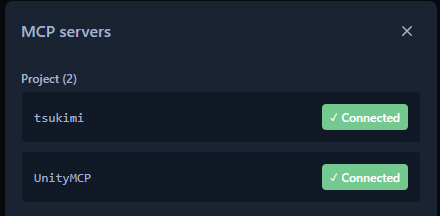
| Tools visible | 6 (ping, inspect, test, diagnostics, spec, decompile) |
| When none are visible | Either the client was launched before the configuration was written, or it was launched outside the project |
Checking the database
Section titled “Checking the database”Run one short source through inspect and externDb comes back.
"externDb": { "resolved": true, "unknownApiChecks": true, "externCount": 32898 }resolved | True means it could be read. While it is false, APIs that really exist are reported as missing |
| When it is false | When you have never once opened this project in Unity |
externCount | The number of APIs read. It varies with the SDK version you installed, so your number differing from the one above is fine |
Servers used alongside it
Section titled “Servers used alongside it”Placing things in a scene, assigning references in the Inspector, and checking with Play all lie outside this server; to let an AI touch those too, use an MCP server that drives the Unity editor from outside alongside it.
Servers of that kind are published by third parties and are not included in this package (for MCP for Unity, put the following address into Add package from git URL in Unity’s package manager).
https://github.com/CoplayDev/unity-mcp.git?path=/MCPForUnity#mainTelling apart what went wrong
Section titled “Telling apart what went wrong”| Symptom | Cause | What to do |
|---|---|---|
| TsukimiCode doesn’t appear in the menu | Either the package isn’t installed, or the project doesn’t compile | Read Unity’s console. If there is a compile error, that comes first |
| The tsukimi tools don’t appear in the client | It was launched before the configuration, or launched outside the project | Restart it directly under the project. Check that the client’s row in the window says configured |
| Pressing Configure changed nothing | A running client reads its configuration only at startup | Restart the client |
| Install Skill was pressed but the AI doesn’t know the instructions | The instructions that were written out are also read by the client only at startup | Restart the client |
| The AI writes code without consulting the Skill | The instructions haven’t been loaded by the client | Check that Grounding in the window is up to date, press it again, and restart |
| Only Codex CLI can’t connect | The project isn’t trusted | Trust it by that client’s procedure, then restart |
| Can’t connect after updating the package | The server location written in the configuration changed with the update | Press Configure and Install Skill again, then restart the client |
| Updated, but the server behaves as it did before | The client is still running the old server | Restart the client (the server restarts with it) |
| Server Status is not found | The bundled server DLL can’t be found | Install the package again |
| It keeps saying an API that should exist is missing | The database of runtime APIs hasn’t been generated | Open this project once in Unity. This is the state whenever externDb.resolved is false |
| No way to tell whether the completion check is running | Nothing appears when compilation succeeds | Look at Last check in the window. If the field says out of date, press Install Check again |
| The AI placed a file but nothing happens in Unity | Unity doesn’t import a file placed from outside until focus returns to it | Click the Unity window once |
| Nothing happens when you touch it in the scene | The Inspector reference is empty | Assign it in the UdonBehaviour field. Udon has no exception handling, so nothing appears in the log |
When none of these rows fixes it, reopen the window, read each section’s status from the top, and start from the first one that is off.